CLIC - Future Ergonomic Mouse

A new form for everyday computing
01
The Tech Paradox

For many students, designers, and office workers, pointing devices are used for hours every day.
Yet most consumer mice are optimized for features and styling rather than long-term comfort and concentration.

The Concept
This project explores how the physical form and interaction logic of a mouse can reduce wrist strain and unnecessary cognitive effort during extended use.


Behavioral Patterns of Gen-Z Computing
“Muscle fatigue rises significantly after 45 min (ErgoLab, MIT 2019).”
Reducing strain during long sessions
Modern computing habits are built around long sessions.
Ergonomic benefit must come from the device itself, reducing strain while people work, not only when they remember to take breaks.
From Insight to Requirements
03
Why Current “Ergonomic Mice” Still Cause Problems
Many “ergonomic” mice solve strain by forcing users into unfamiliar vertical or angled positions.
While these reduce wrist extension, they introduce new issues: reduced precision, bulky form factors, and slow adaptation.
Interviews and research showed that people return to flat mice not because they are healthier, but because they are familiar and fast.
The real opportunity is not to change behavior, but to support the hand within the posture users already prefer.
What Today’s Mice Solve and What They Ignore


Logitech MX Master 3S

Razer Pro Click V2
Evoluent VerticalMouse

Delux Ergonomic Mouse

Apple Magic Mouse

Razer Pro Click V2

Design Opportunity
1. Familiar Performance, Zero Learning Curve
2. Support the Body, Not Just the Task
3. Awareness Without Burden
4. Replaceable, Maintainable, Long-Lived

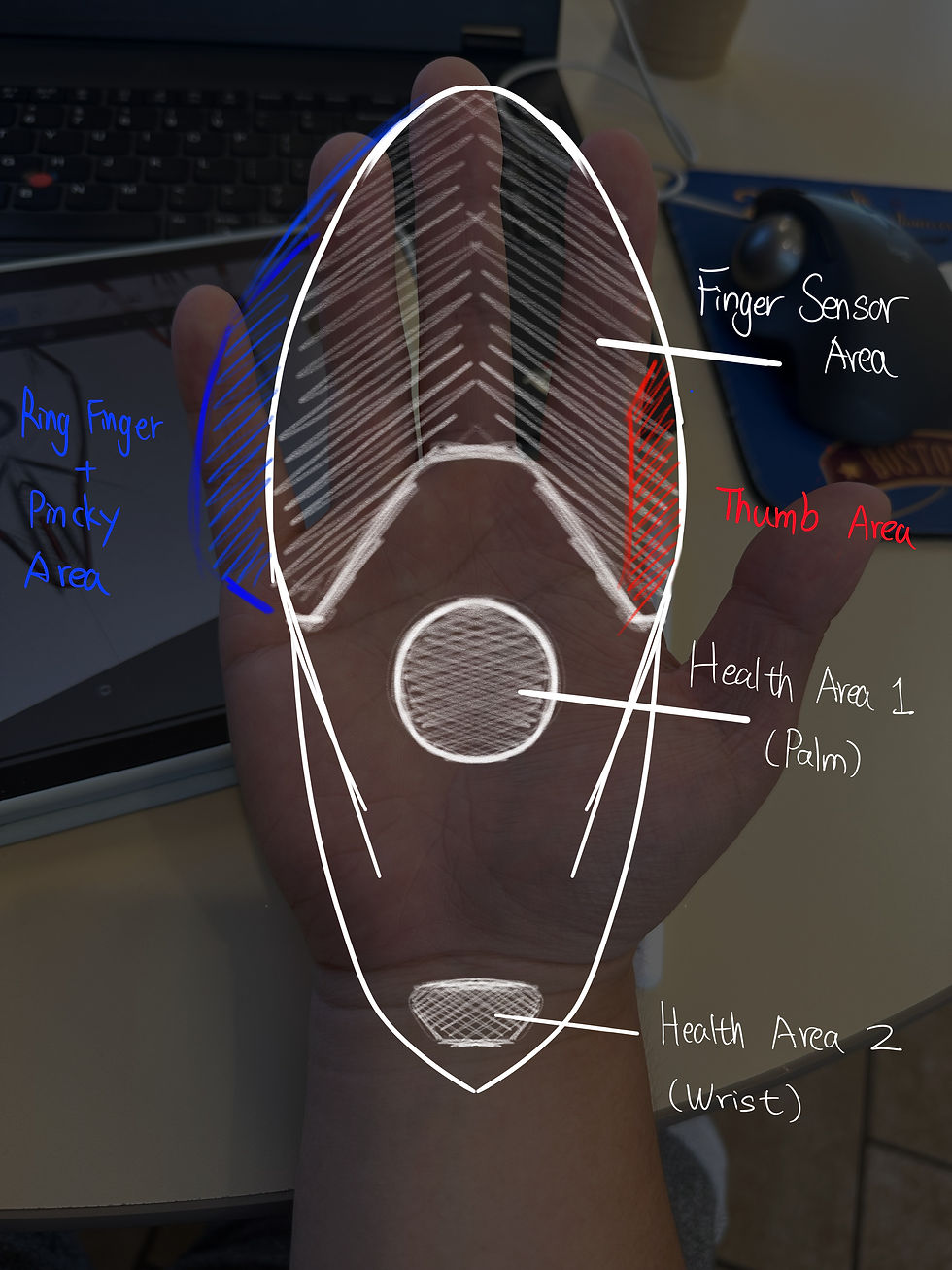

These parameters informed the initial prototype geometry, focusing on palm stabilization, fluent contact , and an angled support surface to decrease wrist extension while preserving finger reach.
A new logic ...


A new standard for performance and wellness
04
Form Exploration
Design Study


"Dominate"


Design Development
Too angled
Unfamiliar grip
poor reach
Good palm cradle
Balanced support
Promising Structure
05
Prototyping

Prototype Test — Ergonomic Impact
Usability testing

Baseline (Flat Mouse)
To understand how the prototype performs in everyday work, users tested the mouse while performing typical laptop tasks.
I focused on how the wrist behaved over time, specifically whether palm stabilization reduced wrist extension compared to a flat mouse.

Wrist Extension view
Parameter-Driven Refinement
06
Refinement
-
Palm ramp softened → reduces pressure spots
-
Thumb channel added → improved grip stability
-
Rear weight redistributed → prevents wrist drag
-
Low learning curve maintained → still feels like a normal mouse
Design Improvement
06
Result


Adjustable Wrist Angle

Index / Mid Finger Area
Thumb Resting Curvature
Wrist Rest Zone
Thumb Movement - Trackball Function

Ring Finger + Pincky movement - Power Scroll
total symmetrical - both hands usage

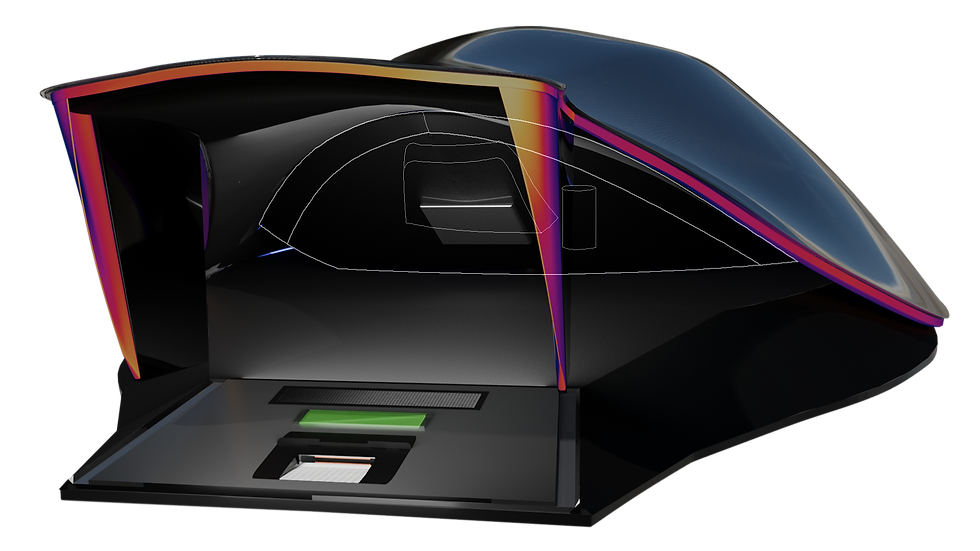
Wrist Health Scanner
Embedded within the lower shell, the wrist sensor reads real-time biometric data

Palm Sensor Module
Palm sensor tracks blood pressure and stress through temperature and sweat signals using optical and thermal micro-sensors.
Soft Click Input Architecture
Tap with a finger to activate a click
OR
Gently press with their wrist, triggering a subtle front-end dip + vibration that mimics the feel of a physical click
Spectrum

Gentle green flashing & vibration alarm prompts breaks, promoting healthier work habits
Adaptive Modes for Different Workloads
Optional Soud Indication


Wrist Sensor Construction
Multi-layer sensor stack reads pulse and temperature through wrist contact
Wrist Sensor Construction
Multi-layer sensor stack reads pulse and temperature through wrist contact
Palm Sensor Construction
Captures heart rate and skin temperature through optical detection
LED Diffusion Layer — Soft Silicone

Main Shell — Liquid Glass Polymer
Sub-Shell Reinforcement Layer
LED Diffusion Layer — Soft Silicone
Underbody Illumination Ring
Adjustable Rear Support Struts
Palm Sensor Set
Mid-Body Frame
Finger Touch Sensor Layer
Purpose Recap

Material Strategy & Long-Term Durability
07

Obsidian Polymer – Structural Core Layer
Obsidian Polymer forms the internal body of the mouse, delivering rigid support with a dark satin finish. Its smooth, low-gloss surface minimizes glare and visual noise, creating contrast beneath the transparent shell. Engineered for durability and strength, this material anchors the overall form while reinforcing the product’s technical and futuristic aesthetic.

Selected for its flexibility, thermal resistance, and soft-touch finish, this silicone element is molded to diffuse internal LED light evenly across the front edge. Its durable, rubber-like composition absorbs micro-impacts while maintaining a clean, seamless glow. The material’s pliability also simplifies assembly and ensures a flush integration with the surrounding body.
Translucent Silicone Diffuser


Brushed Black Anodized Aluminum Base
Chosen for its high strength-to-weight ratio and structural rigidity, this anodized aluminum base anchors the mouse with stability and precision. The brushed finish reduces visual noise and resists surface wear, while the rigid metal foundation provides a durable interface for mounting internal components. Its clean edge profile ensures seamless integration with the upper housing layers.
Liquid Glass Polymer forms the outer shell, offering a glass-like finish with the durability of high-grade synthetic material. Its transparent, glossy surface reveals the structure beneath, creating a sense of depth and precision while enhancing comfort through a soft-touch interface. Designed to protect embedded sensors and reduce glare, it delivers long-term clarity, tactile quality, and a modern, refined aesthetic.
Liquid Glass Polymer – Transparent Surface Layer

