CLIC - Future Ergonomic Mouse

A new form for everyday computing
Goal: Investigate how mouse geometry and grip posture affect wrist strain and long-duration comfort for desk workers.
Human–Computer Interaction
Ergonomic Research
Physiological Awareness
For many students, designers, and office workers, pointing devices are used for hours every day.
Yet most consumer mice are optimized for features and styling rather than long-term comfort and concentration.

Observations were drawn from informal use scenarios involving prolonged computer use, alongside reference to established ergonomic guidelines.
Research Intent
The CLIC mouse is positioned as a design-led research exploration into how everyday input devices can support long-term ergonomic awareness during extended computer use. The project focuses on understanding the relationship between hand posture, pressure distribution, and perceived fatigue, rather than proposing a finalized consumer
Key Research Questions
How does mouse geometry influence wrist and hand posture over long-duration use?
What physiological indicators are meaningful for behavioral awareness rather than medical diagnosis?
How can modular electronic systems support iterative research and long-term device use in institutional environments?

The Concept
This project explores how the physical form and interaction logic of a mouse can reduce wrist strain and unnecessary cognitive effort during extended use.
Everyday Use & Ergonomic Context
Problem: Flat mice place the wrist in an extended, unsupported posture.
Design Direction: Stabilize the palm so the wrist can rest in a neutral position without changing how people naturally use the device.


Behavioral Patterns of Gen-Z Computing
“Muscle fatigue rises significantly after 45 min (ErgoLab, MIT 2019).”
Reducing strain during long sessions
Modern computing habits are built around long sessions.
Ergonomic benefit must come from the device itself, reducing strain while people work, not only when they remember to take breaks.
Sources:
Rempel, D., Barr, A., & Brafman, D. (2008).
The effect of six computer mice on wrist posture, forearm pronation, and muscle activity.
Human Factors, 50(5), 782–790.
Hedge, A. (2016).
Ergonomic workplace design for health, wellness, and productivity.
CRC Press.
MacKenzie, I. S. (2013).
Human–Computer Interaction: An Empirical Research Perspective.
Morgan Kaufmann.
ISO 9241-410:2008.
Ergonomics of human-system interaction — Input devices.
International Organization for Standardization.
Methods
1. Observed over 20 users using standard mice for 20–40 minutes
2. Documented grip type, wrist angle tendencies, pressure points
3. Compared 2–3 geometry directions using foam/3D mockups
4. Logged comfort feedback using a 1–5 scale

Everyday Use & Ergonomic Context
Extended computer work involves prolonged interaction between the hand, input device, and desk surface, often lasting several hours with limited recovery time. During these sessions, hand posture and wrist alignment are not static; users continuously adjust grip, redistribute pressure, and alter muscle engagement in response to fatigue and task demands.
Human–computer interaction and ergonomics research identifies these micro-adjustments as a key factor influencing long-term comfort and strain development (Rempel et al., 2008; Hedge, 2016)
From a human-factors perspective, the mouse functions as a dynamic interface that mediates load transfer, tactile feedback, and fine motor control rather than a fixed object optimized for a single posture.
Figures:
1. Higher palm support improved stability but increased heat/pressure buildup
2. Angled posture reduced wrist extension but required a guided grip transition
3. Thumb rest placement strongly affected perceived control during dragging
4. Users preferred “relaxed grip” shapes even if precision slightly decreased
Palm & Thenar Area
Thumb Support
Palm Grip

Finger Contact Points
Wrist Contact Zone
Claw Grip


Deviated Position
Adaptive Shift

Neutral Position
Sensor Strategy & Experimental Variables
Building on observed hand posture, contact zones, and grip behavior patterns, the next step focuses on identifying interaction variables that can be monitored to better understand ergonomic load distribution during extended computer use.
Rather than treating sensing as a feature, sensors are positioned as research probes used to observe behavioral and physical trends over time.
The emphasis is placed on relative change, pattern consistency, and directional variation, rather than absolute measurement or medical accuracy.
Observational Focus
1. Pressure variation
2. Contact duration
3. Grip stability and adjustment frequency

These parameters informed the initial prototype geometry, focusing on palm stabilization, fluent contact , and an angled support surface to decrease wrist extension while preserving finger reach.
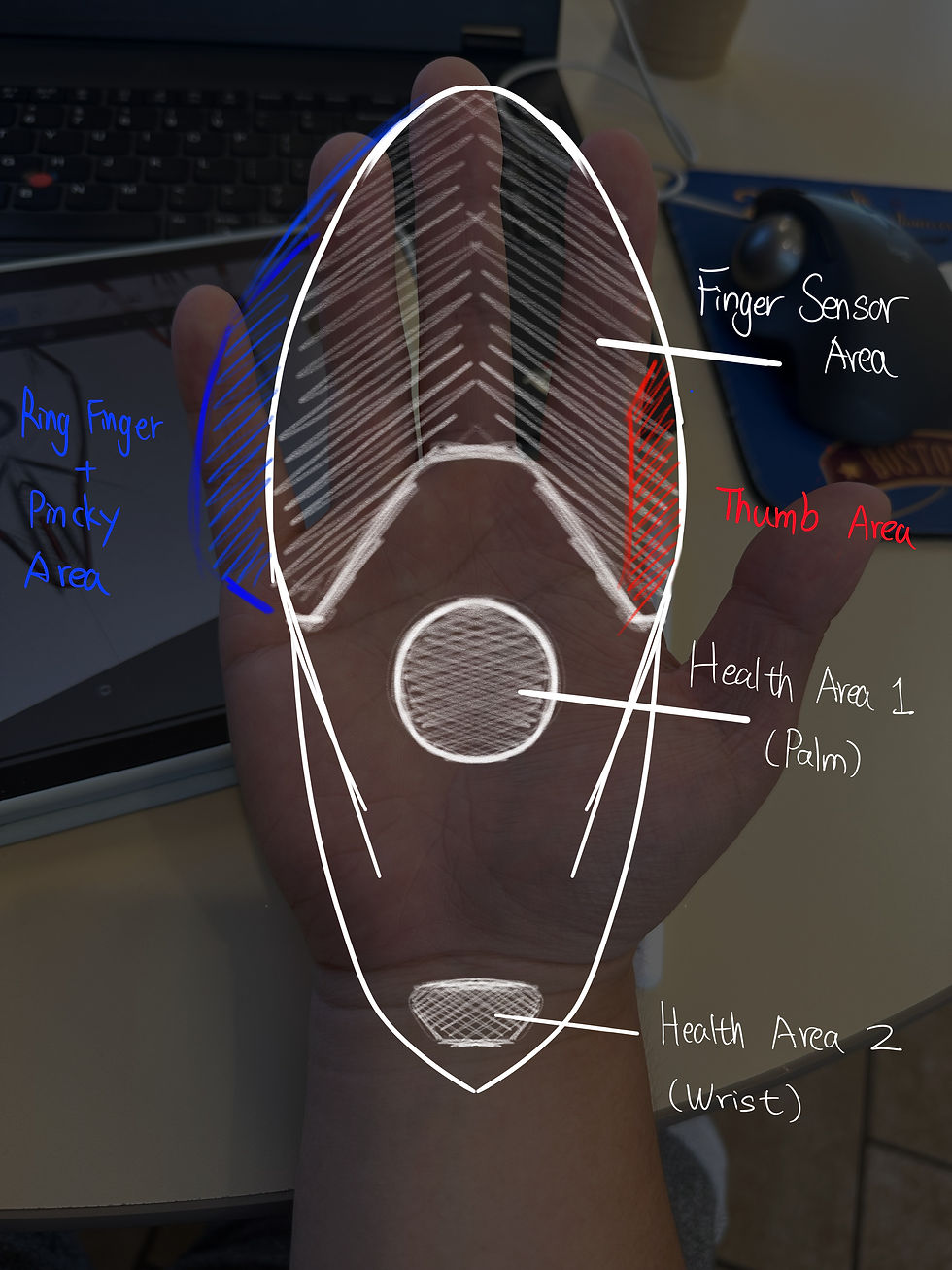
Sensor Placement Rationale
1. Palm base region
2. Index and middle finger zones
3. Thumb support area

These design principles translate the research into clear ergonomic requirements: the mouse should stabilize the hand through palm-supported control rather than relying on wrist support, and it should guide the user toward a neutral wrist posture without forcing an unnatural grip.
The primary click surfaces should align with the natural finger curl direction to reduce repetitive strain, while the overall form should minimize pinch-grip dependency by increasing surface contact and distributing load more evenly across the hand.
In precision tasks, the geometry should support stable micro-movements to reduce wobble during drag operations, and the contact zones should be designed for long-session comfort by avoiding high-pressure hotspots and improving overall pressure and heat relief.
Precedent & Comparative Input Device Landscape
Following the identification of key ergonomic variables and interaction zones, existing input devices were reviewed to understand how current design approaches address long-duration use, posture variation, and pressure distribution.
This comparison is not intended to evaluate commercial success, but to situate the research within the broader landscape of established ergonomic strategies.
Traditional low-profile mice
Vertical or semi-vertical mice
Physiological Awareness
Precedent & Comparative Input Device Landscape
Following the identification of key ergonomic variables and interaction zones, existing input devices were reviewed to understand how current design approaches address long-duration use, posture variation, and pressure distribution.
What Today’s Mice Solve and What They Ignore


Logitech MX Master 3S

Razer Pro Click V2

Evoluent VerticalMouse
Delux Ergonomic Mouse

Apple Magic Mouse


Razer Pro Click V2
A new logic ...

Physical Interaction Observation


Observed hand–mouse interactions across multiple input device forms, highlighting variation in grip posture, reach, and contact behavior during typical use.
Extended mouse use reveals consistent physical behaviors that are difficult to infer from geometry alone.
Direct observation highlights how users adapt hand posture, finger reach, and grip position across different device forms during real interaction. These behaviors inform practical constraints related to comfort, accessibility, and long-duration use.
Key Observation
- Finger reach varies significantly across forms, particularly for secondary buttons and scroll interaction
- Steeper body angles can reduce wrist deviation but often increase strain in finger extension
- Narrow bodies encourage precision but reduce palm support during prolonged use
- Users frequently shift grip position to compensate for discomfort over time


Form Development Driven by Ergonomic Constraints
"Dominate"
Early form studies showed a clear tension between posture correction and comfort. More angled forms eased wrist alignment but strained the fingers, while lower profiles improved reach but increased wrist extension.
These insights guided the form toward a balanced geometry that supports neutral posture while allowing natural movement.

Unfamiliar grip
Too angled
poor reach
System Architecture & Design Synthesis
Modularity supports iteration rather than customization, allowing internal components to be adjusted or replaced as the design evolves. By integrating ergonomic constraints, sensor logic, and internal structure into a resolved form, the project moves from exploration to a cohesive research platform, leading directly into the final design outcome as a complete, testable artifact.

Balanced body angle
Supports neutral wrist alignment without forcing a fixed posture
Extended palm contact zone
Distributes load across a larger surface during long-duration use
Aligned button plane
Improves finger reach while maintaining relaxed hand posture
Continuous support surface
Allows natural grip shifting over time
System Architecture & Design Synthesis

The final design brings ergonomic insight and structural logic into a single, resolved form. Shown both as an object and in use, it balances posture support with natural movement and is intended as a platform for continued testing rather than a finished product.

In-Use Validation
1. Natural finger separation without forced positioning
2. Continuous palm support during static and dynamic use
3. Wrist remains close to neutral during resting interaction
Prototype Validation & Research Continuation
A physical prototype was built to test key ergonomic assumptions beyond digital form studies.
Through hands-on use, posture, grip behavior, and contact stability were observed across different hand sizes, helping evaluate how the geometry supports natural movement during extended use. These insights guide future refinement and position the design as an evolving research platform rather than a finished product.
.png)
%20-%20Copy.png)
This prototype represents an early validation step and a foundation for continued testing and refinement.
Usability testing

Baseline (Flat Mouse)
To understand how the prototype performs in everyday work, users tested the mouse while performing typical laptop tasks.
I focused on how the wrist behaved over time, specifically whether palm stabilization reduced wrist extension compared to a flat mouse.

Wrist Extension view
Design Improvement
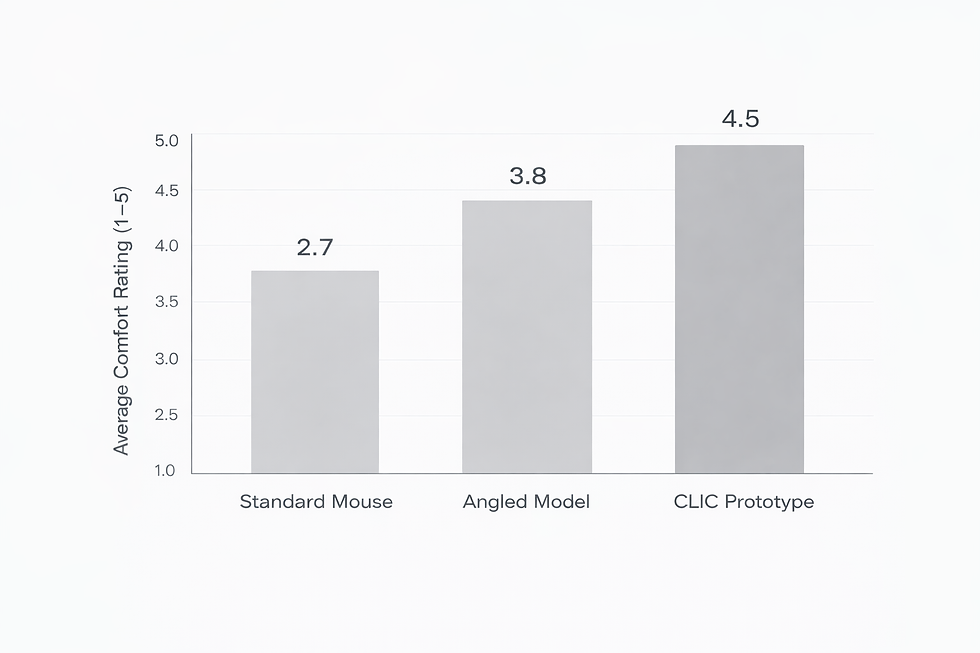
More than twenty people were observed using standard mice during 20–40 minute computer sessions and later interacting with multiple geometry mockups.
Participants shared informal feedback around comfort, fatigue, and hand posture based on their own experience.
Across these interactions, the CLIC geometry was consistently described as noticeably more comfortable than standard and angled mouse forms.
Users reported reduced wrist tension and better overall hand support, which aligned with observed improvements in wrist neutrality and palm contact. This feedback informed the final geometry direction and supports further ergonomic evaluation in future research settings.
Design Improvement
1. Palm ramp softened → reduces pressure spots
2. Thumb channel added → improved grip stability
3. Rear weight redistributed → prevents wrist drag
4. Low learning curve maintained → still feels like a normal mouse
